Hi everyone ✋
In the previous post we got Godot installed, created a project, and ran our very first script using EditorScript. One file, one keystroke, one line in the Output panel.
Today we are going to throw that away 😱
Not because it was wrong ─ it was the fastest possible route to seeing our own code run. But EditorScript is a side door. It runs in the editor, and it has nothing to do with how game code actually executes. So today we walk in through the front door.
Three things are on the table ─
- What
extendsactually means, and why every script file is secretly a class. - The three callbacks that drive everything ─
_ready(),_process(delta), and_physics_process(delta). - Comments, which sound boring but have one real trap in them.
And we will finish with a label on screen counting up in real time 🥳
Let’s take a deep dive 🤿
Every script file is a class 🤔
Let’s look at last post’s script again ─
@tool
extends EditorScript

func _run() -> void:
    print("Let's build indie games")
Notice something missing?
There is no class keyword anywhere. And yet this file is a class. Not a script that contains a class ─ the file itself is the class.
This is the single most useful sentence in this post, so let’s say it slowly ─ in GDScript, the file is the class body. The extends line declares what we inherit from, and everything written after it at indentation level zero is a member of that class. Variables become fields. Functions become methods.
Think about what the languages we know demand instead ─
- C++ wants a
class Foo { ... };block, and traditionally a header and an implementation file. - Java wants
public class Foo { }, and the filename has to match it. - C# wants a namespace, a class, and usually a partial declaration if the engine is involved.
- Kotlin and Swift want
class Foo { }too, even though they are relaxed about filenames.
GDScript wants none of it. We open a file, we write extends, we start writing members.
Coming-from note 🤔 ─ there is no header, no implementation split, no namespace, no
import, nousing, and nopackagedeclaration to keep in sync. There is also no top-level code the way Python allows ─ we cannot put a looseprint()at the bottom of the file and expect it to run, because the file is a class definition, not a script body.
So what are we extending?
Every GDScript file extends something. If we leave extends off entirely, Godot quietly assumes RefCounted, which is a plain reference-counted object that knows nothing about scenes.
That is rarely what we want. For game code, the base class we care about is Node, because Node is the thing that can live in a scene tree. A few we will be using constantly ─
extends Node─ a plain node. No position, no visuals. Perfect for logic and managers.extends Node2D─ a node with a 2D transform, so it has a position, rotation, and scale.extends Sprite2D─ aNode2Dthat also draws a texture.extends Label─ a UI node that draws text. We will use this one at the end of the post.
Notice that these are increasingly specific ─ Sprite2D already is a Node2D, which already is a Node. Ordinary single inheritance, exactly what we expect. When we write extends Sprite2D, our script inherits every property and method a sprite has, for free.
Let’s build a real scene
Here is the part EditorScript let us skip. To run game code, we need a scene with a node in it, and our script attached to that node.
It takes about twenty seconds ─
- Go to Scene → New Scene.
- In the Scene dock, click Other Node and pick a plain Node.
- Rename it to something meaningful ─ I called mine
Anatomy. - Right-click the node and choose Attach Script. Leave the base class as
Nodeand create it. - Save the scene with Ctrl + S (Cmd + S on macOS). This writes a
.tscnfile.
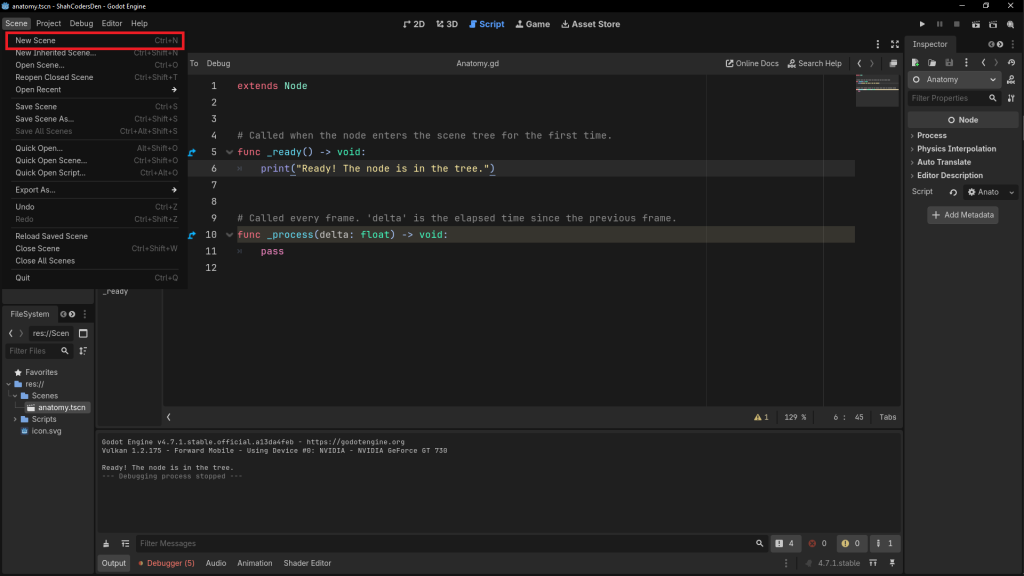
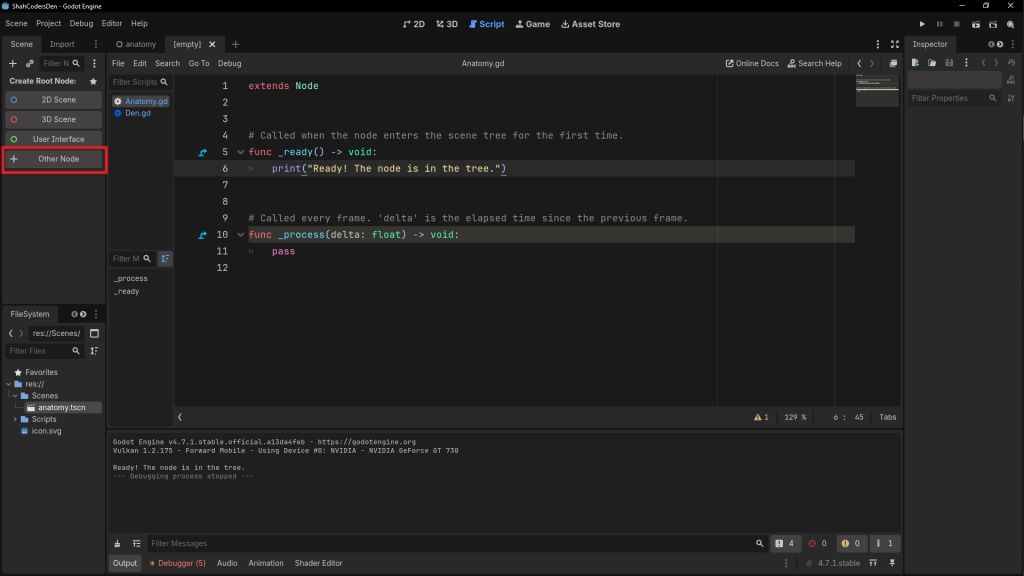
Now press F6 to run the current scene. A window opens, it is completely empty, and nothing appears to happen 🙂 That is correct ─ our script does nothing yet. But the important thing is that the engine is now running our node.
Two run keys are worth separating right now ─
- F5 runs the project, starting from whatever we set as the main scene. The first time we press it, Godot will ask us to pick one.
- F6 runs the scene we are currently editing. While learning, this is the one we want almost every time.
The template Godot hands us
When we attached that script, Godot filled it in for us ─
extends Node


# Called when the node enters the scene tree for the first time.
func _ready() -> void:
    pass


# Called every frame. 'delta' is the elapsed time since the previous frame.
func _process(delta: float) -> void:
    pass
No @tool this time, because we are not running in the editor anymore. No _run(), because that only existed for EditorScript.
Instead we get two functions with underscore prefixes, and Godot has helpfully commented what each one is. Those two comments are the whole lifecycle in miniature, so let’s take them apart properly.
_ready() ─ where things begin
This runs once, when the node and all of its children have entered the scene tree. It is where we do setup ─ initialise variables, grab references, set a starting value.
Let’s actually use it ─
extends Node


func _ready() -> void:
    print("Ready! The node is in the tree.")
Press F6 and look at the Output panel. There it is, printed exactly once 🥳
Now, the tempting thing is to file _ready() away as “the constructor.” It is not, and that will eventually bite us.
The actual constructor is _init(), which fires the moment the object is created in memory. _ready() fires later ─ once the node has been attached into the running scene tree. Between those two moments the node exists but has no parent, no siblings, and no place in the world. There is also an ordering rule worth remembering ─ children become ready before their parents.
We are going to spend a whole post on this in Phase 3. For now, _ready() is our setup spot and that is enough.
Coming-from note 🤔 ─ there is no
main()here and no entry point we control. We never call_ready(); the engine calls it. Our job is to fill in the callbacks and let the node’s lifecycle drive the code. If we have writtenonCreate()in Android,viewDidLoad()in iOS, or a component mount hook on the web, this inversion of control is already familiar territory.
_process(delta) ─ every single frame
This one runs as often as the engine possibly can ─ typically 60 times a second, but genuinely whatever the machine manages. And it hands us a parameter called delta.
delta is the number of seconds that passed since the previous frame. At a smooth 60 FPS it will be roughly 0.0166. If the machine stutters, it gets bigger.
Let’s see it ─
extends Node


func _process(delta: float) -> void:
    print(delta)
Run it and the Output panel floods with small floating point numbers. Notice they are not identical ─ they wobble frame to frame. That wobble is the entire reason delta exists.
Here is the mistake almost everyone makes once. Say we want something to move ─
# WRONG ─ moves 5 pixels per FRAME
position.x += 5
On a 60 FPS machine that is 300 pixels per second. On a 144 Hz monitor it is 720 pixels per second. Same code, and the game is now more than twice as fast for one player as for another 😱
# RIGHT ─ moves 200 pixels per SECOND, on any machine
position.x += 200 * delta
Multiplying by delta converts “per frame” into “per second.” The rule is simple and it never changes ─ anything that should happen at a rate over time gets multiplied by delta.
Coming-from note 🤔 ─ if we have written a game loop by hand in C++ or Java, we have computed this value ourselves with a high-resolution timer and passed it around. Godot just gives it to us as a parameter. Same idea, none of the plumbing.
_physics_process(delta) ─ the fixed clock
This third callback is not in the template, but we can add it ourselves. It looks almost identical to _process ─ and the difference is genuinely important.
_process runs on a variable clock, as fast as the machine allows. _physics_process runs on a fixed clock ─ 60 times a second by default, regardless of frame rate. Its delta is therefore essentially constant at 0.01666...
Let’s watch both at once ─
extends Node


func _process(delta: float) -> void:
    print("process:         ", delta)


func _physics_process(delta: float) -> void:
    print("physics_process: ", delta)
The _process numbers jitter. The _physics_process numbers sit still. That is the whole distinction.
Why does a fixed clock matter? Because physics simulation needs predictable steps to stay stable. If the timestep jumped around, collisions would behave differently on different machines ─ which is exactly the class of bug nobody wants to debug.
So, which do we reach for?
_ready() |
_process(delta) |
_physics_process(delta) |
|
|---|---|---|---|
| How often | Once | Every frame | Fixed, 60 Hz by default |
delta value |
─ | Varies | Constant |
| Use it for | Setup | Visuals, UI, timers, input | Physics bodies, movement, collisions |
A practical detail while we are here 👀 Godot only turns on frame processing if the callback actually exists in our script. That means an empty _process() full of pass is not free ─ it still costs a script call every single frame, for nothing. So if we are not using it, let’s delete it rather than leave it sitting there.
Comments 🤔
Comments start with #, and that is the whole story for a normal comment ─
# a single line comment

var health: int = 100  # comments can trail code too
There is one trap, and it catches people coming from every C-family language ─ GDScript has no block comments. There is no /* ... */. For several lines, we repeat the # on each one.
And a specific warning for anyone whose fingers learned Python. Typing """ does not create a comment ─ it creates a genuine multiline string. It happens to be harmless as a bare statement, and Godot will flag it as a standalone expression that does nothing, but it is a string sitting in our code, not a comment.
There is one more form worth knowing about. A double hash, ##, makes a documentation comment ─
## The player's current hit points.
var health: int = 100


## Reduces health and dies at zero.
func take_damage(amount: int) -> void:
    health -= amount
These are not decoration. Godot reads them and shows them in the editor’s own help window, so our custom classes get documentation exactly like built-in ones. The catch is placement ─ a ## comment has to sit immediately before the member it describes, with nothing in between.
Coming-from note 🤔 ─
##is our Javadoc, our XML doc comment, our///. Same purpose, different marker, and it wires straight into the editor with no external tool to run.
Mini-project ─ a label that counts up ⏱️
Enough printing. Let’s put something on screen.
The goal is a piece of text that shows how long the scene has been running, updating every frame. Here is the setup ─
- Scene → New Scene.
- Click Other Node and choose Label. Make it the root of the scene.
- Right-click it and Attach Script. This time the base class will already say
Label. - Save the scene.
And the script ─
extends Label

## Seconds since the scene started running.
var elapsed: float = 0.0


func _ready() -> void:
    text = "0.00"


func _process(delta: float) -> void:
    elapsed += delta
    text = "%.2f" % elapsed
Press F6 and watch it tick 🥳
Small script, but two lines in it deserve a proper look.
elapsed += delta is us accumulating real seconds. Because delta is measured in seconds, adding it every frame gives us wall-clock time no matter what frame rate the machine is running at.
And then there is text. Where did that come from? We never declared it 🤔
It came from Label. We wrote extends Label, so our script is a Label ─ and text is one of the properties every Label has. There is no reference to fetch, no this.label.text, no node lookup. Assigning to text assigns to our own property, and the label on screen redraws itself.
That is the payoff of “the file is the class.” Our script does not control a node from outside. Our script is the node.
The "%.2f" % elapsed bit is just string formatting, trimming the float to two decimal places. It will look familiar from C’s printf and Python’s % operator, and we will cover it properly when we get to strings.
So what should we remember? 🤔
Let’s wrap up the key takeaways ─
- Every GDScript file is a class. The file is the class body ─ no
classkeyword, no header split, no namespace, no imports. extendsdeclares the base class. Omitting it silently gives usRefCounted, which cannot live in a scene tree.- To run game code we need a scene, a node, and our script attached to that node.
EditorScriptwas the exception, not the rule. - F6 runs the current scene, F5 runs the whole project. While learning, F6.
_ready()runs once, after the node enters the tree. It is our setup spot ─ but it is not the constructor,_init()is._process(delta)runs every frame on a variable clock.deltais seconds since the last frame, and anything rate-based must be multiplied by it._physics_process(delta)runs on a fixed 60 Hz clock with a constantdelta─ that is where physics and movement belong.- Comments are
#only, with no/* */anywhere. A double##makes a documentation comment that shows up in the editor’s help.
If that all landed, the shape of a GDScript file should feel completely unmysterious now ─ a base class on line one, some members underneath, and a handful of callbacks that the engine calls on our behalf.
Congratulations 🥳🥳🥳
We have written our first real game script, and it is running on screen.
In the next post we will get into variables and data types ─ why static typing is optional in GDScript but we should use it anyway, and the built-in engine types like Vector2 and Color that quietly delete a lot of the boilerplate we are used to writing 😉
Happy Coding 💻 🎵